Error with point cloud when using RTAB-map with an Oak-d


 Locked


Error with point cloud when using RTAB-map with an Oak-d
 
|
I'm very new to the world of slam poetry, so I probably don't understand much of what I'm doing, and I only have a superficial understanding of the rest.
For a competition, I'm using an Oak-D. I need to map in color and with good mapping so I can save it in .ply format. I've managed to do it so far, but my maps have a lot of ghost points, and for example, a wall ends up looking like many points far apart from each other. 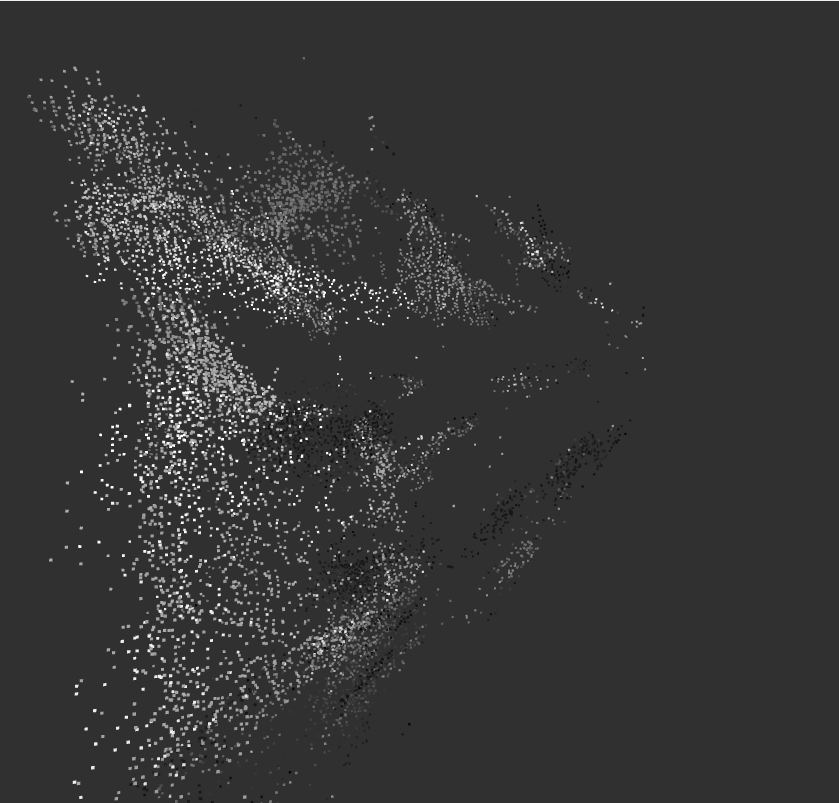 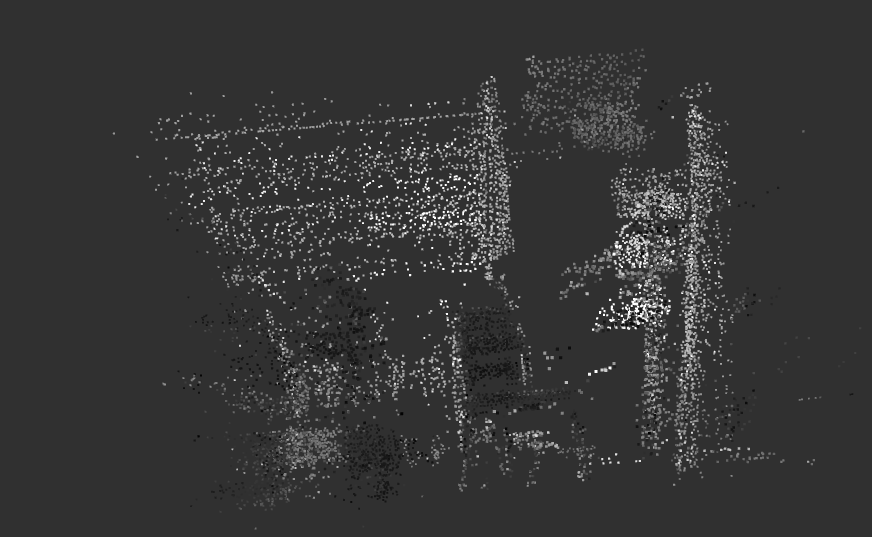 I need to find a way to make the points closer together. My question is whether this is possible without using lidar, or if I absolutely need to use a high-quality lidar. I've also attached the launcher I'm using to run the camera. Launch: "# depthai_test.launch.py - CON IMU (igual que el original) # Basado en depthai.launch.py con optimizaciones para Jetson Orin Nano 8GB # # Usage: # $ ros2 launch rtabmap_examples depthai_test.launch.py camera_model:=OAK-D import os from ament_index_python.packages import get_package_share_directory from launch import LaunchDescription from launch_ros.actions import Node from launch.actions import IncludeLaunchDescription from launch.launch_description_sources import PythonLaunchDescriptionSource def generate_launch_description(): # Parámetros - CON IMU y Madgwick (configuración estable) parameters=[{ 'frame_id': 'oak-d-base-frame', 'subscribe_rgbd': True, 'subscribe_odom_info': True, 'approx_sync': False, 'wait_imu_to_init': True, # Esperar IMU # IMU - configuración que funcionaba estable 'Odom/GuessMotion': 'false', # No usar IMU para predecir movimiento # Odometría visual - OPTIMIZADO para Jetson (menor consumo RAM) 'Vis/MinInliers': '6', # Balance estabilidad/rendimiento 'Vis/MinDepth': '0.2', 'Vis/MaxDepth': '4.0', # Reducido para menos carga 'Vis/FeatureType': '6', # ORB 'Vis/MaxFeatures': '200', # REDUCIDO de 500 (menos RAM) 'GFTT/MinDistance': '10', # Más separados = menos features 'Odom/ResetCountdown': '2', # Limitar framerate para reducir carga 'Rtabmap/DetectionRate': '1.0', # Solo 1 Hz para SLAM (reduce carga) 'Odom/ImageDecimation': '2', # Reducir resolución para odometría # Grid/PointCloud 'Grid/RangeMin': '0.3', 'Grid/RangeMax': '4.0', 'Grid/DepthDecimation': '4', # Nube de puntos 'Grid/MaxGroundHeight': '0.1', 'Grid/MaxObstacleHeight': '2.0', 'Grid/NormalsSegmentation': 'false', 'Mem/NotLinkedNodesKept': 'false', # Visualización 'cloud_decimation': 2, 'cloud_max_depth': 4.0, 'cloud_voxel_size': 0.1, }] # Remapping de IMU remappings=[('imu', '/imu/data')] return LaunchDescription([ # Launch camera driver IncludeLaunchDescription( PythonLaunchDescriptionSource([os.path.join( get_package_share_directory('depthai_examples'), 'launch'), '/stereo_inertial_node.launch.py']), launch_arguments={ 'depth_aligned': 'false', 'enableRviz': 'false', 'monoResolution': '400p' }.items(), ), # Sync right/depth/camera_info together Node( package='rtabmap_sync', executable='rgbd_sync', output='screen', parameters=parameters, remappings=[ ('rgb/image', '/right/image_rect'), ('rgb/camera_info', '/right/camera_info'), ('depth/image', '/stereo/depth') ]), # Filtro Madgwick para IMU - configuración estable Node( package='imu_filter_madgwick', executable='imu_filter_madgwick_node', output='screen', parameters=[{ 'use_mag': False, 'world_frame': 'enu', 'publish_tf': False, 'gain': 0.01, # Valor bajo = menos sensible al ruido 'zeta': 0.01, }], remappings=[('imu/data_raw', '/imu')]), # Visual odometry CON IMU Node( package='rtabmap_odom', executable='rgbd_odometry', output='screen', parameters=parameters, remappings=remappings), # VSLAM Node( package='rtabmap_slam', executable='rtabmap', output='screen', parameters=parameters, remappings=remappings, arguments=['-d']), # Visualización Node( package='rtabmap_viz', executable='rtabmap_viz', output='screen', parameters=parameters, remappings=remappings) ])" All this is with Ubuntu 22.04 with ROS2 Humble |
Administrator
|
If the camera's depth estimation is dense, you would actually get more points than lidar with high image resolution. However, unlike lidar, the 3D points could be a lot more noisier.
Can you share a database recorded with your camera? Here an example from another post I just answered of a point cloud you could expect (though in this case it was using librealsense2 for depth estimation). EDIT: Note also that if you are looking at the cloud_map topic in RVIZ, it would be voxelized at 5 cm cells. If you need high density point clouds, use MapCloud rviz plugin and subscribe to mapData topic (you can decrease decimation parameter in the MapCloud display settings to get it more dense). It can also be done offline from the database generated with for example: $ rtabmap-export --cloud --decimation 1 --voxel 0 rtabmap.db |
Re: Error with point cloud when using RTAB-map with an Oak-d
|
|
Thank you very much for your reply. Let me send you the database I created during one of the mapping sessions.
DB= https://drive.google.com/file/d/1mcHgsy5XnqOUx4smW4QbglkisSl07w8o/view?usp=sharing Thanks to your advice about rviz, I've been playing around with the parameters a little, but to be honest, the change hasn't been very significant. Many fans still appear, and I still have some strange data. I'm attaching the difference between how it looks in rviz and in the rtabmap viewer. 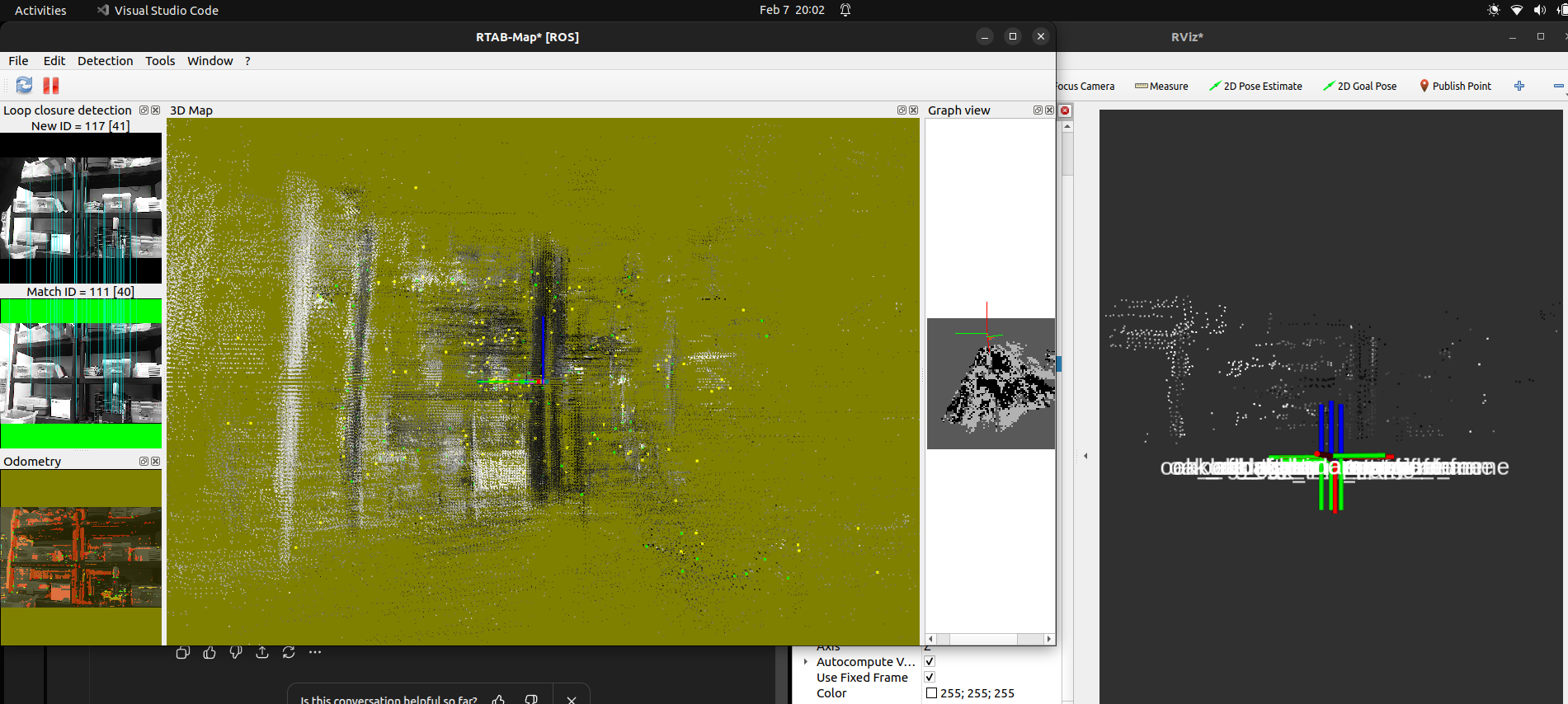 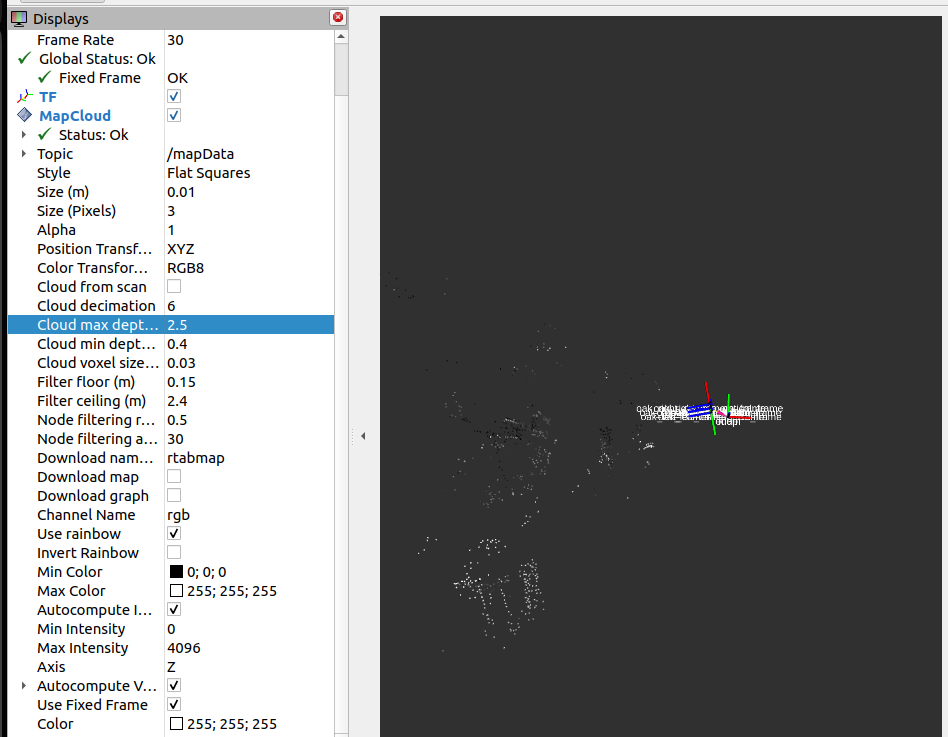 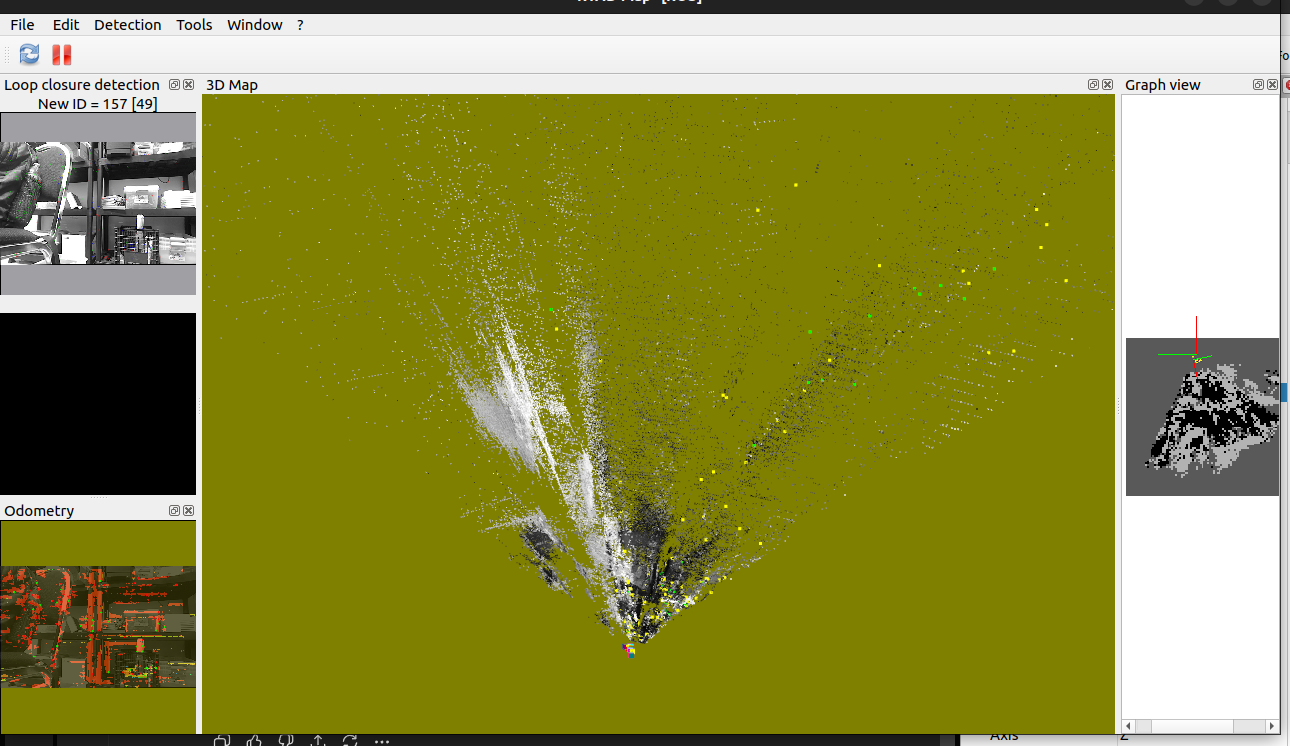 Launch: "import os from ament_index_python.packages import get_package_share_directory from launch import LaunchDescription from launch.actions import IncludeLaunchDescription from launch.launch_description_sources import PythonLaunchDescriptionSource from launch_ros.actions import Node def generate_launch_description(): # Configuración de parámetros de RTAB-Map rtabmap_params = [{ # --- Frames --- 'frame_id': 'oak-d-base-frame', 'subscribe_rgbd': True, 'subscribe_odom_info': True, 'approx_sync': False, # --- IMU --- 'wait_imu_to_init': True, 'Odom/GuessMotion': 'true', # Usar IMU para orientación 'Reg/Force3DoF': 'true', # Indoor: plano 2D # --- Depth (CRÍTICO) --- 'RGBD/MinDepth': '0.4', 'RGBD/MaxDepth': '2.0', 'RGBD/DepthDecimation': '2', # --- Odometría visual (ENDURECIDA) --- 'Vis/FeatureType': '6', # ORB 'Vis/MaxFeatures': '300', 'Vis/MinInliers': '25', 'Vis/InlierDistance': '0.05', 'Vis/InlierRatio': '0.25', 'Odom/ImageDecimation': '2', 'Odom/ResetCountdown': '1', # --- RTAB-Map --- 'Rtabmap/DetectionRate': '1.0', 'RGBD/LinearUpdate': '0.1', 'RGBD/AngularUpdate': '0.05', 'RGBD/OptimizeFromGraphEnd': 'true', # --- Memoria --- 'Mem/NotLinkedNodesKept': 'false', # --- Grid / Map --- 'Grid/RangeMin': '0.4', 'Grid/RangeMax': '2.5', 'Grid/DepthDecimation': '4', 'Grid/MaxGroundHeight': '0.15', 'Grid/MaxObstacleHeight': '2.2', 'Grid/NormalsSegmentation': 'false', }] imu_remap = [('imu', '/imu/data')] return LaunchDescription([ # ===================================================================== # OAK-D DRIVER # ===================================================================== IncludeLaunchDescription( PythonLaunchDescriptionSource( os.path.join( get_package_share_directory('depthai_examples'), 'launch', 'stereo_inertial_node.launch.py' ) ), launch_arguments={ 'depth_aligned': 'false', 'enableRviz': 'false', 'monoResolution': '400p' }.items() ), # ===================================================================== # RGBD SYNC # ===================================================================== Node( package='rtabmap_sync', executable='rgbd_sync', output='screen', parameters=rtabmap_params, remappings=[ ('rgb/image', '/right/image_rect'), ('rgb/camera_info', '/right/camera_info'), ('depth/image', '/stereo/depth') ] ), # ===================================================================== # IMU FILTER # ===================================================================== Node( package='imu_filter_madgwick', executable='imu_filter_madgwick_node', output='screen', parameters=[{ 'use_mag': False, 'world_frame': 'enu', 'publish_tf': False, 'gain': 0.02, 'zeta': 0.01 }], remappings=[ ('imu/data_raw', '/imu') ] ), # ===================================================================== # RGBD ODOMETRY # ===================================================================== Node( package='rtabmap_odom', executable='rgbd_odometry', output='screen', parameters=rtabmap_params, remappings=imu_remap ), # ===================================================================== # RTAB-MAP SLAM # ===================================================================== Node( package='rtabmap_slam', executable='rtabmap', output='screen', parameters=rtabmap_params, remappings=imu_remap, arguments=['-d'] ), # ===================================================================== # RTABMAP VIZ (Visualización) # ===================================================================== Node( package='rtabmap_viz', executable='rtabmap_viz', output='screen', parameters=rtabmap_params, remappings=imu_remap ), ])" |
|
Administrator
|
I see cloud decimation set to 6 in rviz, set it to 1 for more points.
The noise you are seeing is caused by the poor depth disparity generated with your camera. I would recommend to ask on https://github.com/luxonis/depthai-ros why is it that noisy? and how to make it less noisy? Maybe there are some parameters to make the disparity computation returning only the most confident and accurate points. Other option is to use stereo mode of rtabmap, and it will recompute disparity with our own approach (cv::StereoBM), which should be already less noisy than what you have. I created an example for depthai driver here (depthai_stereo.launch.py) to do so. Make sure to add the depthai baseline fix described at the top of the launch file. cheers, Mathieu |
«
Return to Official RTAB-Map Forum
|
1 view|%1 views
| Free forum by Nabble | Edit this page |