Rtabmap + ZED2i TF Error


 Locked


 
|
This post was updated on .
Hi, I am trying to connect ZED to Rtabmap for vslam, but keep getting this error even after trying many variations of settings. Does someone know why this might be happening and what the error means?
[ERROR] (2026-02-25 19:12:19.447) MsgConversion.cpp:2182::convertRGBDMsgs() TF of received image for camera 0 at time 1772064739.025150s is not set! I am running: ros2 launch rtabmap_launch rtabmap.launch.py \ rtabmap_args:="–delete_db_on_start Rtabmap/TFBufferSize 500" \ rgb_topic:=/zed2i/zed_node/rgb/color/rect/image \ depth_topic:=/zed2i/zed_node/depth/depth_registered \ camera_info_topic:=/zed2i/zed_node/rgb/color/rect/camera_info \ depth_camera_info_topic:=/zed2i/zed_node/depth/camera_info \ imu_topic:=/zed2i/zed_node/imu/data \ odom_topic:=odom \ frame_id:=zed2i_camera_link \ approx_sync:=true \ wait_imu_to_init:=false \ wait_for_transform_duration:=0.02 \ always_check_imu_tf:=false \ rgbd_odometry:=false \ approx_sync_max_interval:=0.02 ros2 launch zed_wrapper zed_camera.launch.py \ camera_model:=zed2i \ camera_name:=zed2i \ node_name:=zed_node \ publish_tf:=false \ publish_map_tf:=false \ publish_imu_tf:=true \ imu_enabled:=true \ depth_mode:=DEPTH_MODE_PERFORMANCE \ enable_depth:=true \ pos_tracking_enabled:=true \ use_sim_time:=false |
Administrator
|
I could not reproduce the TF error.
Here what I am trying (tested with a zedm and using zed odometry) ros2 launch zed_wrapper zed_camera.launch.py \ camera_model:=zedm \ camera_name:=zed2i \ node_name:=zed_node \ publish_tf:=true \ publish_map_tf:=false \ publish_imu_tf:=true \ imu_enabled:=true \ depth_mode:=DEPTH_MODE_PERFORMANCE \ enable_depth:=true \ pos_tracking_enabled:=true \ use_sim_time:=false ros2 launch rtabmap_launch rtabmap.launch.py \ rtabmap_args:="--delete_db_on_start Rtabmap/TFBufferSize 500" \ rgb_topic:=/zed2i/zed_node/rgb/color/rect/image \ depth_topic:=/zed2i/zed_node/depth/depth_registered \ camera_info_topic:=/zed2i/zed_node/rgb/color/rect/camera_info \ depth_camera_info_topic:=/zed2i/zed_node/depth/camera_info \ imu_topic:=/zed2i/zed_node/imu/data \ odom_topic:=/zed2i/zed_node/odom \ frame_id:=zed2i_camera_link \ approx_sync:=true \ rgbd_sync:=true \ approx_rgbd_sync:=false \ wait_imu_to_init:=false \ always_check_imu_tf:=false \ visual_odometry:=falseWithout zed odometry, it is also working. ros2 launch zed_wrapper zed_camera.launch.py \ camera_model:=zedm \ camera_name:=zed2i \ node_name:=zed_node \ publish_tf:=false \ publish_map_tf:=false \ publish_imu_tf:=true \ imu_enabled:=true \ depth_mode:=DEPTH_MODE_PERFORMANCE \ enable_depth:=true \ pos_tracking_enabled:=false \ use_sim_time:=false ros2 launch rtabmap_launch rtabmap.launch.py \ rtabmap_args:="--delete_db_on_start" \ rgb_topic:=/zed2i/zed_node/rgb/color/rect/image \ depth_topic:=/zed2i/zed_node/depth/depth_registered \ camera_info_topic:=/zed2i/zed_node/rgb/color/rect/camera_info \ depth_camera_info_topic:=/zed2i/zed_node/depth/camera_info \ imu_topic:=/zed2i/zed_node/imu/data \ frame_id:=zed2i_camera_link \ approx_sync:=false \ wait_imu_to_init:=true \ always_check_imu_tf:=false I also tried latest from source and current humble binaries. Also using latest zed ros2 package. What is your system and which rtabmap/zed versions are you using? Also are you using zed with nitros? You can disable nitros to debug here. I get however these kind of warnings (using latest rtabmap_ros): Could be related to my computer/USB cable, here rqt_runtime_monitor with only zed wrapper running (no subscription, no rtabmap), it is dropping more than 30% of frames! That would be the reason why I get many warnings alike above. 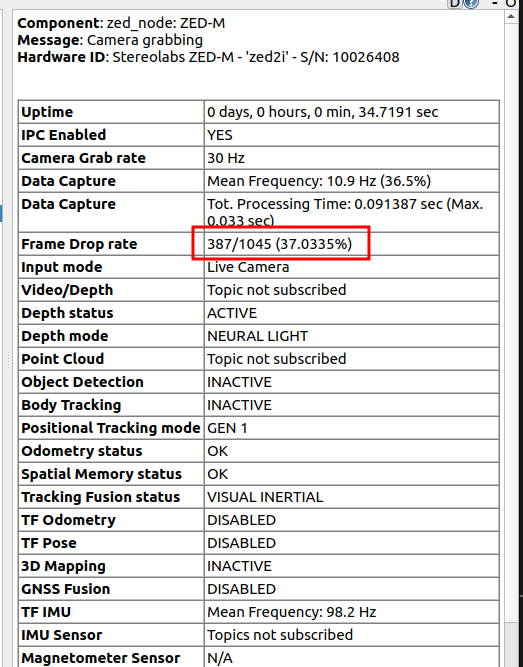 |
«
Return to Official RTAB-Map Forum
|
1 view|%1 views
| Free forum by Nabble | Edit this page |