Re: Combine 3D Lidar and RGB-D Camera to create a single 3D point cloud (sensor fusion)
Posted by Alex Frantz on
URL: http://official-rtab-map-forum.206.s1.nabble.com/Combine-3D-Lidar-and-RGB-D-Camera-to-create-a-single-3D-point-cloud-sensor-fusion-tp10162p10354.html
Hi Mathieu,
Thanks for the speedy reply! Okay, this clarifies things now. Indeed I need a merged point cloud online, so this solution works well for me :)
In parallel, I have been transitioning from the Gazebo simulation to a real robot, using the same configuration (RTABMAP, robot config, etc...). I ran however into a new "problem".
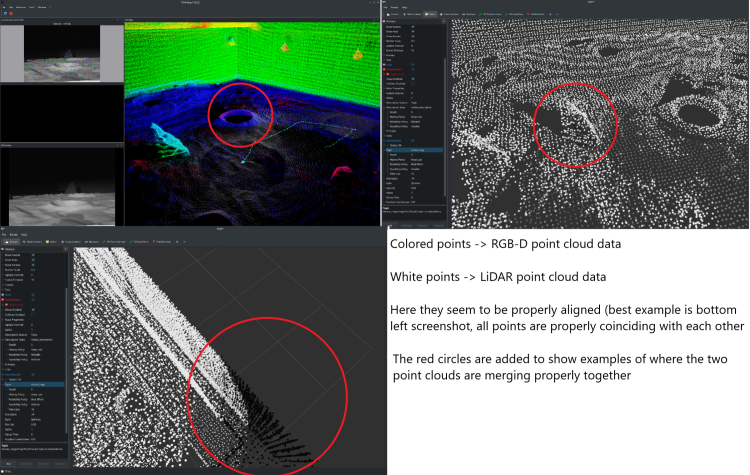
When running the launch configuration for RTABMAP on the real robot, (with Grid/Sensor:2), the final point cloud (the merge between RGB-D camera and LiDAR) seems to not be aligned properly. In fact, I notice a considerable displacement between the two (see images). What's more, is that in the Gazebo simulation this displacement is completely absent, which has lead to some confusion on my end.
At first I thought that perhaps RTABMAP does not look at the transforms from Camera -> Base_Footprint and LiDAR -> Base_Footprint when merging both point clouds (i.e. simply adds all the points into a single PointCloud2 message without checking whether they should be aligned further), but this does not seem to make sense because in the simulation, RTABMAP correctly merges them and aligns them as expected (no shift in the two point clouds).
Another point to add is that both robot descriptions, real and in simulation, are identical.
Here are some screenshots to give you a visual example:
Simulation:
Real Example:
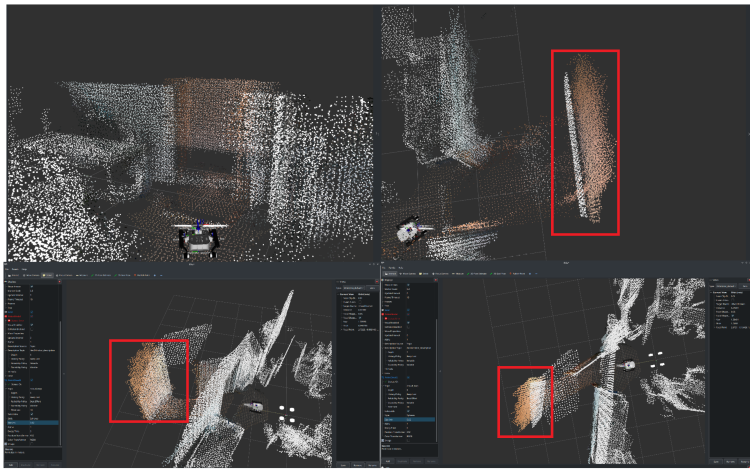
In the real example, there is a shift between white and colored points, where in fact they should be one on top of another (i.e. part of the same object). This does not happen in the simulation.
----
The RTABMAP launch file remains the same as the one you have provided in the above solution (same thread), just with two parameters changed:
1. "RGBD/CreateOccupancyGrid: true"
2. "Grid/Sensor: 2"
I am subscribing to the "/cloud_map" topic which is visualized in the screenshots, and the reference frame for RVIZ is "/map".
In terms of the sensor placement on the real/simulated robot, I am also attaching a picture of the robot here:
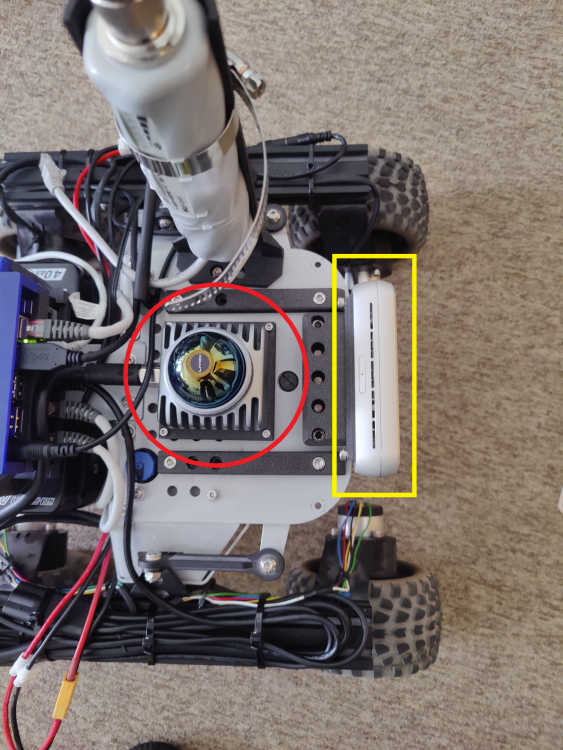
Red circle ---> LiDAR Livox MID360
Yellow Rectangle ---> RealSense RGB-D Camera D455
It might be naive to suggest, but the displacement noted in the merged pointcloud seems to be more or less the same as the distance between the RGB-D camera and the Lidar.. could this be linked to cause of this issue?
My main concern is to figure out a way to properly merge the point clouds in the real-life scenario. Any ideas?
Thanks a lot and I look forward to your reply!
Please let me know if you need more details, I am happy to provide them!
Cheers,
Alex
URL: http://official-rtab-map-forum.206.s1.nabble.com/Combine-3D-Lidar-and-RGB-D-Camera-to-create-a-single-3D-point-cloud-sensor-fusion-tp10162p10354.html
Hi Mathieu,
Thanks for the speedy reply! Okay, this clarifies things now. Indeed I need a merged point cloud online, so this solution works well for me :)
In parallel, I have been transitioning from the Gazebo simulation to a real robot, using the same configuration (RTABMAP, robot config, etc...). I ran however into a new "problem".
When running the launch configuration for RTABMAP on the real robot, (with Grid/Sensor:2), the final point cloud (the merge between RGB-D camera and LiDAR) seems to not be aligned properly. In fact, I notice a considerable displacement between the two (see images). What's more, is that in the Gazebo simulation this displacement is completely absent, which has lead to some confusion on my end.
At first I thought that perhaps RTABMAP does not look at the transforms from Camera -> Base_Footprint and LiDAR -> Base_Footprint when merging both point clouds (i.e. simply adds all the points into a single PointCloud2 message without checking whether they should be aligned further), but this does not seem to make sense because in the simulation, RTABMAP correctly merges them and aligns them as expected (no shift in the two point clouds).
Another point to add is that both robot descriptions, real and in simulation, are identical.
Here are some screenshots to give you a visual example:
Simulation:
Real Example:
In the real example, there is a shift between white and colored points, where in fact they should be one on top of another (i.e. part of the same object). This does not happen in the simulation.
----
The RTABMAP launch file remains the same as the one you have provided in the above solution (same thread), just with two parameters changed:
1. "RGBD/CreateOccupancyGrid: true"
2. "Grid/Sensor: 2"
I am subscribing to the "/cloud_map" topic which is visualized in the screenshots, and the reference frame for RVIZ is "/map".
In terms of the sensor placement on the real/simulated robot, I am also attaching a picture of the robot here:
Red circle ---> LiDAR Livox MID360
Yellow Rectangle ---> RealSense RGB-D Camera D455
It might be naive to suggest, but the displacement noted in the merged pointcloud seems to be more or less the same as the distance between the RGB-D camera and the Lidar.. could this be linked to cause of this issue?
My main concern is to figure out a way to properly merge the point clouds in the real-life scenario. Any ideas?
Thanks a lot and I look forward to your reply!
Please let me know if you need more details, I am happy to provide them!
Cheers,
Alex
| Free forum by Nabble | Edit this page |