Re: Error generating Odometry Data - KITTI Dataset Sequence 00
Posted by matlabbe on
URL: http://official-rtab-map-forum.206.s1.nabble.com/Error-generating-Odometry-Data-KITTI-Dataset-Sequence-00-tp9217p9224.html
Hi,
your odometry processing time is similar to mine (around 40 ms), so it may be not the problem. I followed all my instructions from this post, and it is mapping correctly:
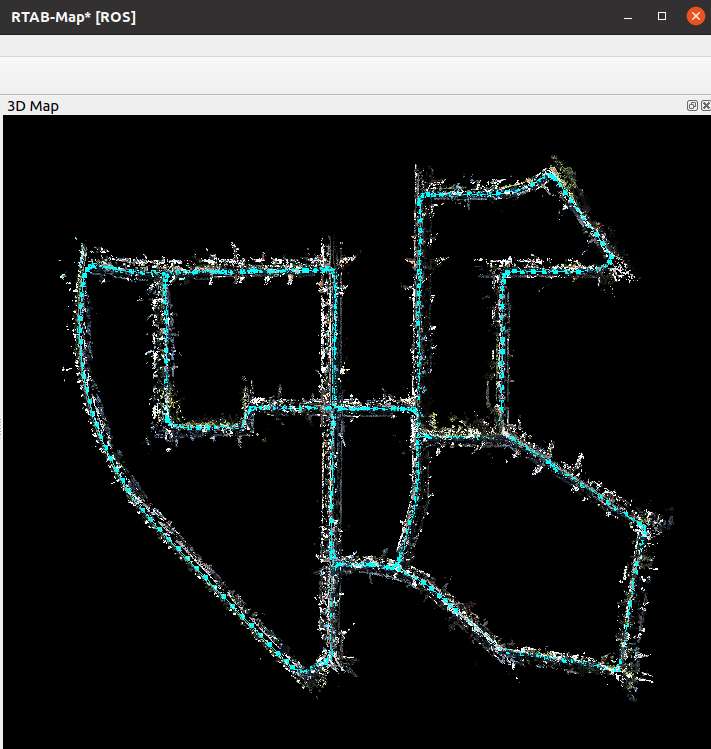
Here are the complete instructions:
1. Download a dataset:
2. Copy "image_00/timestamps.txt" to "image_01/timestamps.txt" and "image_02/timestamps.txt" to "image_03/timestamps.txt"
3. Using kitti2bag, to avoid the pandas error with the docker, do:
4. Now start rtabmap_ros with:
5. For the RAM issue, in rtabmap_viz, do window->Preferences, under 3D Rendering panel:
- set Decimation 8 for Map and Odom columns,
- set ROI "0.001 0.0 0.0 0.0" for Map and Odom columns,
- set Maximum Depth to 30 m for Map column.
6. We are all set, start the bag:
You should see final results as above.
URL: http://official-rtab-map-forum.206.s1.nabble.com/Error-generating-Odometry-Data-KITTI-Dataset-Sequence-00-tp9217p9224.html
Hi,
your odometry processing time is similar to mine (around 40 ms), so it may be not the problem. I followed all my instructions from this post, and it is mapping correctly:
Here are the complete instructions:
1. Download a dataset:
wget https://s3.eu-central-1.amazonaws.com/avg-kitti/raw_data/2011_10_03_drive_0027/2011_10_03_drive_0027_sync.zip
wget https://s3.eu-central-1.amazonaws.com/avg-kitti/raw_data/2011_10_03_calib.zip
unzip 2011_10_03_drive_0027_sync.zip
unzip 2011_10_03_calib.zip
2. Copy "image_00/timestamps.txt" to "image_01/timestamps.txt" and "image_02/timestamps.txt" to "image_03/timestamps.txt"
3. Using kitti2bag, to avoid the pandas error with the docker, do:
$ docker run -v `pwd`:/data -it  --entrypoint /bin/bash tomas789/kitti2bag
# pip install pandas==0.23
# /kitti2bag/docker_entrypoint.sh -t 2011_10_03 -r 0027 raw_synced .
# exit
$ sudo chown $USERNAME kitti_2011_10_03_drive_0027_synced.bag
4. Now start rtabmap_ros with:
roslaunch rtabmap_ros rtabmap.launch \
   stereo:="true" \
   left_image_topic:=/kitti/camera_color_left/image_raw \
   right_image_topic:=/kitti/camera_color_right/image_raw \
   left_camera_info_topic:=/kitti/camera_color_left/camera_info \
   right_camera_info_topic:=/kitti/camera_color_right/camera_info \
   rtabmap_args:="--delete_db_on_start \
      --RGBD/CreateOccupancyGrid false \
      --Rtabmap/ImageBufferSize 0 \
      --Odom/ImageBufferSize 0 \
      --Rtabmap/CreateIntermediateNodes true" \
   approx_sync:=false \
   use_sim_time:=true \
   frame_id:=base_link \
   queue_size:=100
5. For the RAM issue, in rtabmap_viz, do window->Preferences, under 3D Rendering panel:
- set Decimation 8 for Map and Odom columns,
- set ROI "0.001 0.0 0.0 0.0" for Map and Odom columns,
- set Maximum Depth to 30 m for Map column.
6. We are all set, start the bag:
rosbag play --clock --pause kitti_2011_10_03_drive_0027_synced.bag
You should see final results as above.
| Free forum by Nabble | Edit this page |